Savings Goals
Track group savings targets and pooled contributions from all roommates
What Are Savings Goals?
Savings Goals let the house collectively save toward a shared target — for example, a new couch, a security deposit for when you move, a vacation fund, or home improvement supplies. Each roommate can contribute, and the progress is tracked in real time.
ℹ️ Note: Savings Goals are separate from the bill-splitting system. Contributing to a goal does not affect your bill balances.
Create a Goal
Navigate to Savings Goals from the More menu. Click 'New Goal' to open the creation form. Enter a goal name (e.g., 'New Couch'), a target amount, an optional deadline, and optionally select which roommates are participating. Click Save to create the goal.
💡 Tip: Adding a deadline creates a sense of urgency and makes it easier to track whether you're on pace.
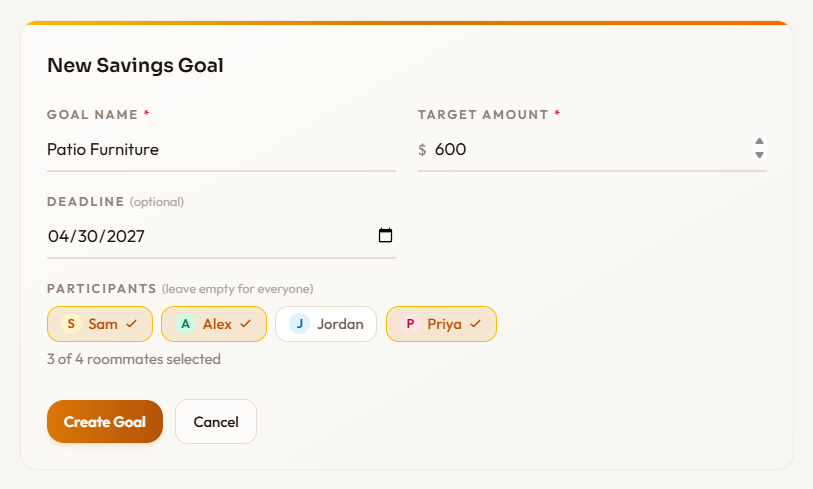
Name your goal, set a target, and optionally add a deadline.
View Goal Progress
Each goal card shows: the goal name, target amount, total contributed so far, a progress bar (green = on track, amber = slightly behind, red = well behind deadline), and the list of contributors with their individual totals.
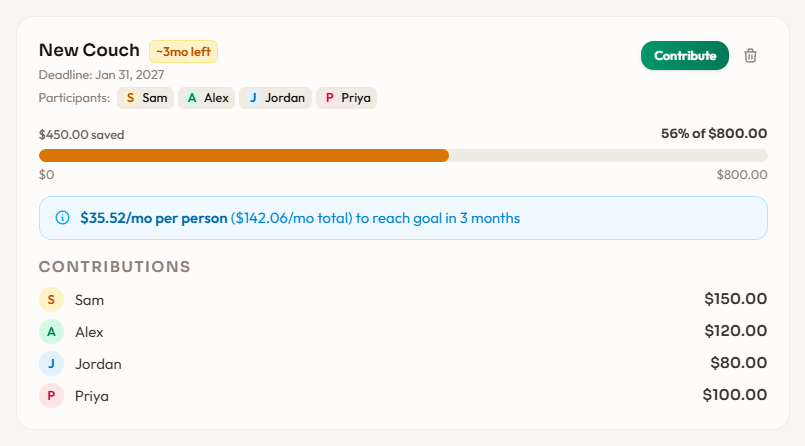
The progress bar updates in real time as contributions are added.
Add a Contribution
Click 'Contribute' on any goal card to open the contribution form. Select which roommate is contributing and enter the amount. Click Save — the progress bar and contributor totals update immediately. Anyone in the house can contribute to any goal.
💡 Tip: You can contribute multiple times to the same goal. Each contribution is tracked separately so you can see the history.
Track Who Has Contributed
The goal card lists every roommate's total contribution. If a roommate hasn't contributed yet, their name appears with $0. This makes it easy to see who needs to chip in and helps prompt fair participation.
Delete a Goal
To delete a goal, click the trash icon on the goal card and confirm. Deleting a goal removes all contribution records associated with it. Consider marking a goal as completed instead of deleting it to preserve the history.
⚠️ Warning: Deleting a goal permanently removes all contribution records. There is no way to recover them.
Troubleshooting
Goal progress bar not updating
Pull to refresh on mobile or reload the page. Contributions update the progress bar in real time — a refresh is sometimes needed to see the latest data.
Can't find a goal I just created
Make sure you're in the correct house. Goals are house-specific. Try refreshing the page.